This episode is freely available thanks to the support of our subscribers

Subscribers get exclusive access to new and all previous subscriber-only episodes, video downloads, and 30% discount for team members. Become a Subscriber

We animate the corner radius of view in combination with a matched geometry effect and learn a lot in the process!

00:06 About a year ago, we exchanged a few messages trying to figure out how to animate a corner radius change while using matchedGeometryEffect. The idea was simple: two views represent the same element, but the corner radius changes during the transition. It felt like this should be straightforward, yet it turned out to be surprisingly tricky. The solution wasn't difficult necessarily, but it wasn't obvious why the approaches we tried initially didn't work.

00:45 Our first instinctive idea is based on how matchedGeometryEffect works internally. It essentially updates frames and positions. If we can hook into the transition process, propagate a progress value through the environment, we can use that progress to drive the corner radius.

A Simple Example Setup

01:30 To test the idea, we start with a minimal example. Instead of building a full grid of views from which one view can expand to fullscreen, we create a single view that can change its size. We write a simple MyView that draws a rounded rectangle with some text on top:

struct MyView: View {
    var body: some View {
        RoundedRectangle(cornerRadius: 8)
            .fill(.yellow)
            .overlay {
                Text("Hello")
            }
    }
}

02:00 We then display this view at two different sizes depending on a state property called large. We wrap the layout in a VStack with a tap gesture that toggles the state. Inside the stack, we switch between the two versions using an if statement:

struct ContentView: View {
    @State var large = false

    var body: some View {
        VStack {
            if large {
                MyView()
                    .padding()
            } else {
                MyView()
                    .frame(width: 100, height: 50)
            }
        }
        .onTapGesture {
            large.toggle()
        }
    }
}

03:08 Adding a basic animation triggered by the large state produces a fade between the two views, because the default transition is .opacity:

struct ContentView: View {
    @State var large = false

    var body: some View {
        VStack {
            if large {
                MyView()
                    .padding()
            } else {
                MyView()
                    .frame(width: 100, height: 50)
            }
        }
        .animation(.linear(duration: 1), value: large)
        .onTapGesture {
            large.toggle()
        }
    }
}

03:29 Next, we add matchedGeometryEffect. We define a namespace and attach the modifier to both views:

struct ContentView: View {
    @State var large = false
    @Namespace var ns
    
    var body: some View {
        VStack {
            if large {
                MyView()
                    .matchedGeometryEffect(id: "id", in: ns)
                    .padding()
            } else {
                MyView()
                    .matchedGeometryEffect(id: "id", in: ns)
                    .frame(width: 100, height: 50)
            }
        }
        .animation(.linear(duration: 1), value: large)
        .onTapGesture {
            large.toggle()
        }
    }
}

03:51 The animation now combines a fade and a geometry transition. What's happening is that one view fades out while the other fades in, and the geometry effect animates the size and position of the incoming view. In the middle of the animation both views are at 50% opacity, but this doesn't add up to 100% yellow, creating a faded look. To avoid that, we try adding an identity transition, but that doesn't quite work. The views now replace each other without animating:

struct ContentView: View {
    @State var large = false
    @Namespace var ns
    
    var body: some View {
        VStack {
            if large {
                MyView()
                    .matchedGeometryEffect(id: "id", in: ns)
                    .transition(.identity)
                    .padding()
            } else {
                MyView()
                    .matchedGeometryEffect(id: "id", in: ns)
                    .transition(.identity)
                    .frame(width: 100, height: 50)
            }
        }
        .animation(.linear(duration: 1), value: large)
        .onTapGesture {
            large.toggle()
        }
    }
}

04:12 Using a .scale transition with a factor of 1 works better:

struct ContentView: View {
    @State var large = false
    @Namespace var ns
    
    var body: some View {
        VStack {
            if large {
                MyView()
                    .matchedGeometryEffect(id: "id", in: ns)
                    .transition(.scale(1))
                    .padding()
            } else {
                MyView()
                    .matchedGeometryEffect(id: "id", in: ns)
                    .transition(.scale(1))
                    .frame(width: 100, height: 50)
            }
        }
        .animation(.linear(duration: 1), value: large)
        .onTapGesture {
            large.toggle()
        }
    }
}

04:48 At this point the geometry animation works well. However, introducing the corner radius change becomes problematic. A first attempt is to pass a large flag into MyView and change the corner radius based on it:

struct MyView: View {
    var large: Double

    var body: some View {
        RoundedRectangle(cornerRadius: large ? 32 : 8)
            .fill(.yellow)
            .overlay {
                Text("Hello")
            }
    }
}

struct ContentView: View {
    @State var large = false
    @Namespace var ns
    
    var body: some View {
        VStack {
            if large {
                MyView(large: true)
                    .matchedGeometryEffect(id: "id", in: ns)
                    .transition(.scale(1))
                    .padding()
            } else {
                MyView(large: false)
                    .matchedGeometryEffect(id: "id", in: ns)
                    .transition(.scale(1))
                    .frame(width: 100, height: 50)
            }
        }
        .animation(.linear(duration: 1), value: large)
        .onTapGesture {
            large.toggle()
        }
    }
}

05:29 The corner radius doesn't animate. The reason is that two separate views exist during the transition: the outgoing view and the incoming one. The incoming view is created immediately with its final values, so the radius jump is instantaneous.

06:36 If we want to control how a view behaves while it's being inserted or removed, we have to use a transition. Transitions provide access to the intermediate phases of appearance and disappearance.

A Custom Transition

07:02 We want to insert the transition before the matched geometry effect. Inside the Transition, we receive a phase parameter describing whether the view is appearing, disappearing, or in its identity state. This allows us to modify properties based on the phase. For example, we can set a corner radius depending on whether the view is in its identity phase:

struct MyTransition: Transition {
    func body(content: Content, phase: TransitionPhase) -> some View {
        content
            .cornerRadius(phase == .identity ? /*...*/)
    }
}

07:53 If we apply the corner radius inside MyTransition — essentially adding a clipping mask — then the shape inside MyView can become a plain rectangle:

struct MyView: View {
    var body: some View {
        Rectangle()
            .fill(.yellow)
            .overlay {
                Text("Hello")
            }
    }
}

08:15 The transition phase behaves differently for incoming and outgoing views. One starts in the .willAppear state and moves toward .identity, while the other moves from .identity to .didDisappear. That means the interpolation direction differs between the two views. We'll have to use something like a flip Boolean to change the values based on which view we're animating.

09:05 For now, we can focus on the larger view, and set the larger corner radius if the phase is equal to .identity:

struct MyTransition: Transition {
    func body(content: Content, phase: TransitionPhase) -> some View {
        content
            .cornerRadius(phase == .identity ? 32 : 8)
    }
}

09:19 We hide the smaller view, so we won't be confused about which view is visible. This also removes the tappable area, so we make the surrounding VStack take the full width and height and we apply a content shape, so we can tap anywhere to toggle between the views. Finally, we apply our new transition:

struct ContentView: View {
    @State var large = false
    @Namespace var ns
    
    var body: some View {
        VStack {
            if large {
                MyView()
                    .transition(MyTransition())
                    .matchedGeometryEffect(id: "id", in: ns)
                    .padding()
            } else {
                MyView()
                    // ...
                    .opacity(0)
            }
        }
        .frame(maxWidth: .infinity, maxHeight: .infinity)
        .contentShape(.rect)
        .animation(.linear(duration: 1), value: large)
        .onTapGesture {
            large.toggle()
        }
    }
}

Unexpected Layout Behavior

10:45 Once we apply the custom transition, the corner radius behaves strangely. Increasing the radius shows that clipping happens outside the padded area.

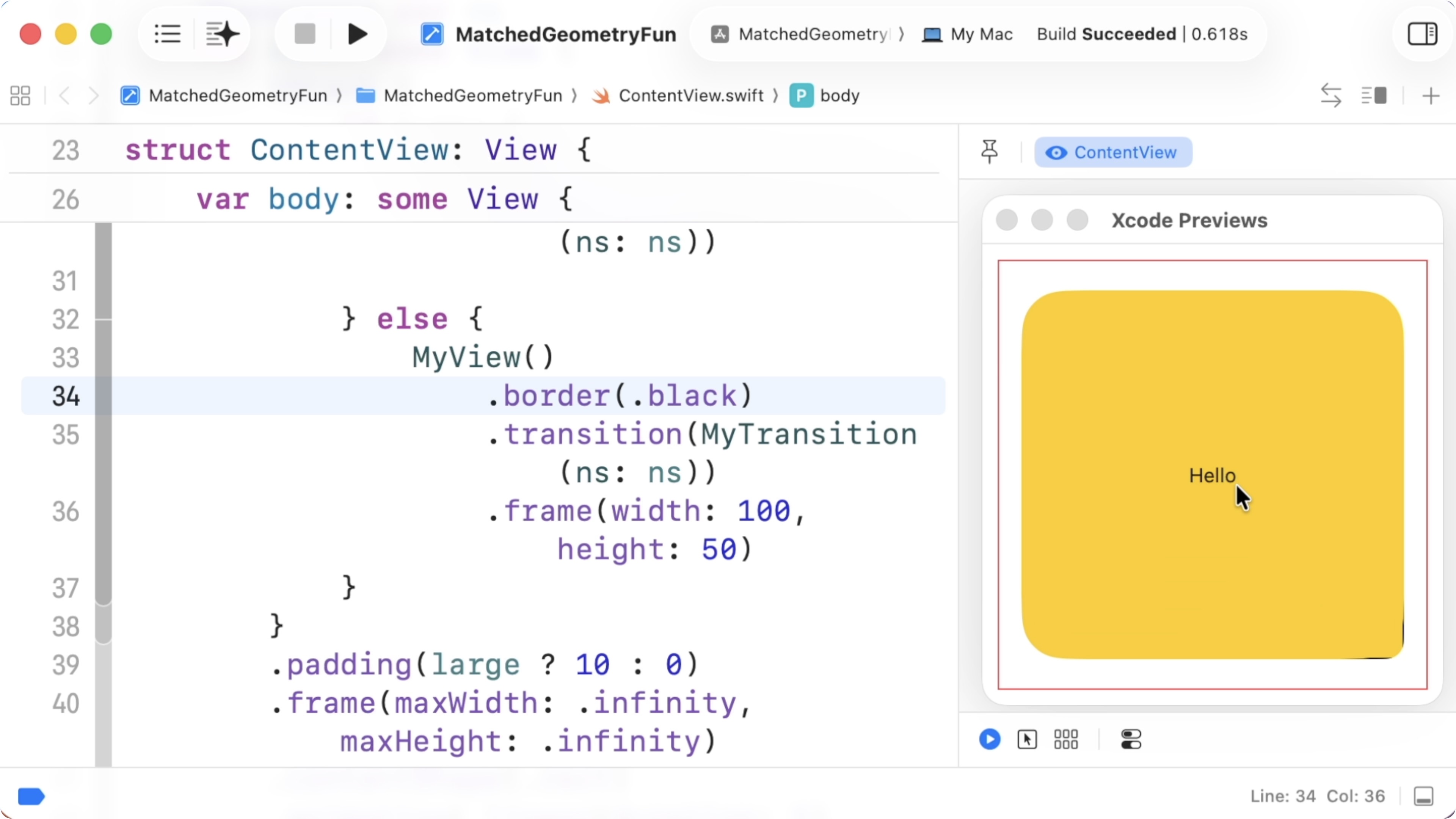
11:34 Adding a border reveals that the modifier order is not what we expected:

11:56 The transition modifiers appear to apply outside the padding. In effect, the system treats the transition as if it were wrapping the entire view hierarchy. This suggests that transitions propagate a value upward and the container applying the insertion or removal actually applies the effects of the modifiers.

13:04 If that's the case, perhaps we can propagate information about where we are in the transition through the environment instead. The transition would set an environment value describing the phase, and the leaf view, MyView, could read it to adjust its corner radius:

extension EnvironmentValues {
    @Entry var isIdentity = true
}

struct MyTransition: Transition {
    func body(content: Content, phase: TransitionPhase) -> some View {
        content
            .environment(\.isIdentity, phase == .identity)
            .cornerRadius(phase == .identity ? 100 : 8)
            .border(.red)
    }
}

struct MyView: View {
    @Environment(\.isIdentity) var isIdentity

    var body: some View {
        Rectangle()
            .fill(.yellow)
            .overlay {
                Text("\(isIdentity)")
            }
    }
}

14:49 We also move the clip shape into MyView and change the corner radius based on the environment value:

struct MyView: View {
    @Environment(\.isIdentity) var isIdentity

    var body: some View {
        Rectangle()
            .fill(.yellow)
            .overlay {
                Text("\(isIdentity)")
            }
            .cornerRadius(isIdentity ? 100 : 8)
    }
}

15:11 Unfortunately, the environment value never changes during the transition. It always resolves to the default value of the environment key, suggesting that transitions don't fully propagate environment changes through the attribute graph. We can change the layout of a view during a transition, or apply a blur effect for example, but changes to the environment values originating from a transition aren't properly hooked up, and we're not sure if this is done on purpose or by accident.

16:49 Since the environment approach doesn't work, we try another idea: move the matchedGeometryEffect inside the transition. That way we can control the modifier order so the corner radius is applied before the geometry effect.

Matched Geometry Effect Inside the Transition

18:10 We move the effect into the transition implementation and we pass the namespace in from the outside, because we need the same namespace for both views:

struct MyTransition: Transition {
    var ns: Namespace.ID
    
    func body(content: Content, phase: TransitionPhase) -> some View {
        content
            .cornerRadius(phase == .identity ? 32 : 8)
            .matchedGeometryEffect(id: "id", in: ns)
            .border(.red)
    }
}

18:38 We make sure both branches use the same transition and we remove the outer matched geometry effects:

struct ContentView: View {
    @State var large = false
    @Namespace var ns
    
    var body: some View {
        VStack {
            if large {
                MyView()
                    .transition(MyTransition(ns: ns))
                    .padding(10)
            } else {
                MyView()
                    .transition(MyTransition(ns: ns))
                    .frame(width: 100, height: 50)
                    .opacity(0)
            }
        }
        .frame(maxWidth: .infinity, maxHeight: .infinity)
        .contentShape(.rect)
        .animation(.linear(duration: 1), value: large)
        .onTapGesture {
            large.toggle()
        }
    }
}

18:47 This still doesn't work correctly because the padding interacts badly with the matched geometry effect. Moving the padding outside the transitioning views fixes the issue:

struct ContentView: View {
    @State var large = false
    @Namespace var ns
    
    var body: some View {
        VStack {
            if large {
                MyView()
                    .transition(MyTransition(ns: ns))
            } else {
                MyView()
                    .transition(MyTransition(ns: ns))
                    .frame(width: 100, height: 50)
            }
        }
        .padding(large ? 10 : 0)
        .frame(maxWidth: .infinity, maxHeight: .infinity)
        .contentShape(.rect)
        .animation(.linear(duration: 1), value: large)
        .onTapGesture {
            large.toggle()
        }
    }
}

19:55 The forward transition now works, but the reverse direction reveal a problem. The text appears in the wrong place and the view's frame remains fixed at 100×50 points, which becomes extra clear when we add a black border around the smaller view:

21:00 The issue is that matchedGeometryEffect is applied outside the fixed frame. Fixed-size views don't work well with the matched geometry effect, so we need to move the frame out to the VStack and make it conditional, just like we did with the padding:

struct ContentView: View {
    @State var large = false
    @Namespace var ns
    
    var body: some View {
        VStack {
            if large {
                MyView()
                    .transition(MyTransition(ns: ns))
            } else {
                MyView()
                    .border(.black)
                    .transition(MyTransition(ns: ns))
            }
        }
        .frame(width: large ? nil : 100, height: large ? nil : 50)
        .padding(large ? 10 : 0)
        .frame(maxWidth: .infinity, maxHeight: .infinity)
        .contentShape(.rect)
        .animation(.linear(duration: 1), value: large)
        .onTapGesture {
            large.toggle()
        }
    }
}

21:48 We also adjust the corner radius logic with a flip flag, so that each view uses the correct starting radius:

struct MyTransition: Transition {
    var ns: Namespace.ID
    var flip: Bool
    
    func body(content: Content, phase: TransitionPhase) -> some View {
        content
            .cornerRadius(phase == .identity ? (flip ? 8 : 32) : (flip ? 32 : 8))
            .matchedGeometryEffect(id: "id", in: ns)
//            .border(.red)
    }
}

22:46 In ContentView, we set the appropriate flip values for each branch:

struct ContentView: View {
    @State var large = false
    @Namespace var ns
    
    var body: some View {
        VStack {
            if large {
                MyView()
                    .transition(MyTransition(ns: ns, flip: false))
            } else {
                MyView()
                    .border(.black)
                    .transition(MyTransition(ns: ns, flip: true))
            }
        }
        .frame(width: large ? nil : 100, height: large ? nil : 50)
        .padding(large ? 10 : 0)
        .frame(maxWidth: .infinity, maxHeight: .infinity)
        .contentShape(.rect)
        .animation(.linear(duration: 1), value: large)
        .onTapGesture {
            large.toggle()
        }
    }
}

22:58 This produces a much smoother animation. The key detail is that frame and padding must be applied outside the transitioning views so they work correctly with the geometry effect.

Using an Animatable Environment Value

23:53 As an alternative approach, we can remove the custom transition entirely and instead animate the corner radius through an environment value. We define a new environment entry for the corner radius and read it inside the view:

extension EnvironmentValues {
    @Entry var cornerRadius: Double = 0
}

struct MyView: View {
    @Environment(\.cornerRadius) private var cornerRadius: Double

    var body: some View {
        Rectangle()
            .fill(.yellow)
            .overlay {
                Text("Hello")
            }
            .cornerRadius(cornerRadius)
    }
}

25:45 Simply writing the value to the environment doesn't animate the corner radius change, because each inserted view immediately receives the final value:

struct ContentView: View {
    @State var large = false
    @Namespace var ns
    
    var body: some View {
        VStack {
            if large {
                MyView()
                    .matchedGeometryEffect(id: "id", in: ns)
                    .padding(10)
            } else {
                MyView()
                    .matchedGeometryEffect(id: "id", in: ns)
                    .frame(width: 100, height: 50)

            }
        }
        .environment(\.cornerRadius, large ? 32 : 8)
        .frame(maxWidth: .infinity, maxHeight: .infinity)
        .contentShape(.rect)
        .animation(.linear(duration: 1), value: large)
        .onTapGesture {
            large.toggle()
        }
    }
}

26:19 To animate the environment change, we have to write an animatable view modifier. This modifier stores the value as animatable data — the @Animatable macro generates the animatable data from our properties:

@Animatable
struct AnimatedCornerRadius: ViewModifier {
    var value: Double
    
    func body(content: Content) -> some View {
        content
            .environment(\.cornerRadius, value)
    }
}

27:06 The animatable modifier writes values into the environment during the animation. We pass in a corner radius value based on the large state:

struct ContentView: View {
    @State var large = false
    @Namespace var ns
    
    var body: some View {
        VStack {
            if large {
                MyView()
                    .matchedGeometryEffect(id: "id", in: ns)
                    .padding(10)
            } else {
                MyView()
                    .matchedGeometryEffect(id: "id", in: ns)
                    .frame(width: 100, height: 50)

            }
        }
        .modifier(AnimatedCornerRadius(value: large ? 32 : 8))
        .frame(maxWidth: .infinity, maxHeight: .infinity)
        .contentShape(.rect)
        .animation(.linear(duration: 1), value: large)
        .onTapGesture {
            large.toggle()
        }
    }
}

27:33 This produces a smooth radius transition. This solution works well, although it feels somewhat indirect. The animation is driven externally rather than by the state of the matched geometry effect. The two systems are effectively decoupled, but that's perfectly fine.

28:22 Both approaches demonstrate workable techniques, even if neither feels entirely ideal. They highlight some surprising behavior in SwiftUI transitions and environment propagation. With additional adjustments, this could also be extended to a grid-based layout.

Resources

  • Sample Code

    Written in Swift 6.2

  • Episode Video

    Become a subscriber to download episode videos.

In Collection

214 Episodes · 74h50min

See All Collections

Episode Details

Recent Episodes

See All

Unlock Full Access

Subscribe to Swift Talk

  • Watch All Episodes

    A new episode every week

  • icon-benefit-download Created with Sketch.

    Download Episodes

    Take Swift Talk with you when you're offline

  • Support Us

    With your help we can keep producing new episodes